Release date: May 25th 2023
The Link 3.6 release focuses on ‘User-friendliness, control and support functions’ to simplify the daily work in Link. The release includes, among other things: Updated dashboards with new Connection statistics, the possibility to change pool sizes during current month, and integration of the AddSecure GIO200 terminal.
New features and major improvements in v3.6
Updated dashboards
To simplify use in Link Manager, the Homepage has been updated with new information.
New panels on the dashboard:
- Connection statistics
In this panel, you can quickly see how many Connections are connected to each operator. - Aggressive connections last 24 hours
Link shows in this table subscriptions that behave incorrectly in the mobile network and need action. It could be, for example, devices that do not work due to an incorrectly programmed APN.
Link introduces a new order status, ‘In progress’, to visualize that AddSecure has taken care of your order and is in the process of delivering the order. And in the Networks panel you can now also see the number of active Connections.
Customers and Users have been removed from the dashboard for partner customers and can be found under the menu options Customers and Administration/Users. This is done to get a better and faster overview of important things in Link Manager.
Pool upgrade and visualization
It’s now possible to upgrade a pool during the current month. The pool can easily be upgraded to a rate plan with higher maximum data within the same communication plan if you are running low on data.
To upgrade a pool, click on the pool in the dashboard and then click ‘Upgrade pool’. During the upgrade, you can test and calculate the pool utilization before the upgrade is performed.
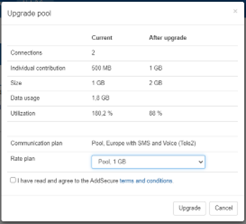
The upgrade can take place at any time during the month to avoid any excess charges.
Pool utilization visualization is also improved in this version to provide better control of data usage.
Users´ audit log
Link now opens the possibility to view which users have logged into your account, including failed logins due to incorrect password or incorrect OTP code. The logs can be found under ‘Administration/Users’.
The feature is searchable so you can easily see a specific user’s logins.
In the next version of Link, the GUI will also be developed to show who and when the users changed different subscriptions.
Integration of GIO200 from Smart Grids
Link is now adapted to simplify for customers using AddSecure terminal GIO200 from Smart Grids.
With the introduction of the Device function in Link, hardware can now be configured, visualized, and controlled from Link Manager. The Device automatically pairs with SIM cards inserted into a Device, providing new capabilities and better control.
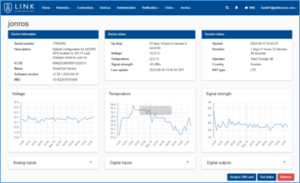
If you want to know more about the function, contact one of our Smart Grid sales representatives or our IoT Link team.
OTP improvement
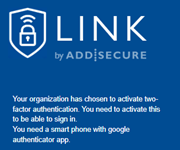
To simplify the management of the two-way login, the OTP login can now be reset by an administrator.
By clicking the [Reset OTP] button, the user’s QR code will be displayed to a user at the next login attempt.
Spotlight
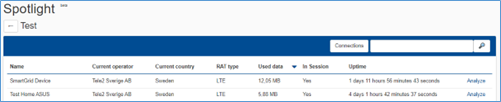
This comprehensive feature is updated after feedback from our customers.
The Spotlight grid now provides direct information about the status of the connected devices in the mobile network.
Other essential new features
- You can now terminate Connections that will not be used again, thus only seeing SIM cards that you use or will use.
- When editing and customizing notification messages, two new tags have been added ‘Customer name’ and ‘Customer number’. A new function has also been introduced so that you can do a test sending of e-mail and SMS.
- The OpenVPN system certificate can now be directly split into four parts to facilitate the installation of system access in certain types of industrial routers. The certificate files are combined in a ZIP file.
- New policy to enable specific public networks for all connections.
Other improvements
- Changed supporting text of IMEI settings in ‘Edit Connection’.
- The service announcement will be displayed in Central European Time (CET).
- User administration: Possibility to set any user’s password.
- Generic grid improvements to sort on IP-address.