
Link Manager is a web-based portal, where the customer administrator can manage Link Connections, Link Access, Link Network, and customer administration. With the Link Manager portal, the administrator has a quick and easy overview of which connections are communicating in which networks and who has access to manage and use devices. The portal gives the administrator full control over subscriptions and data usage.
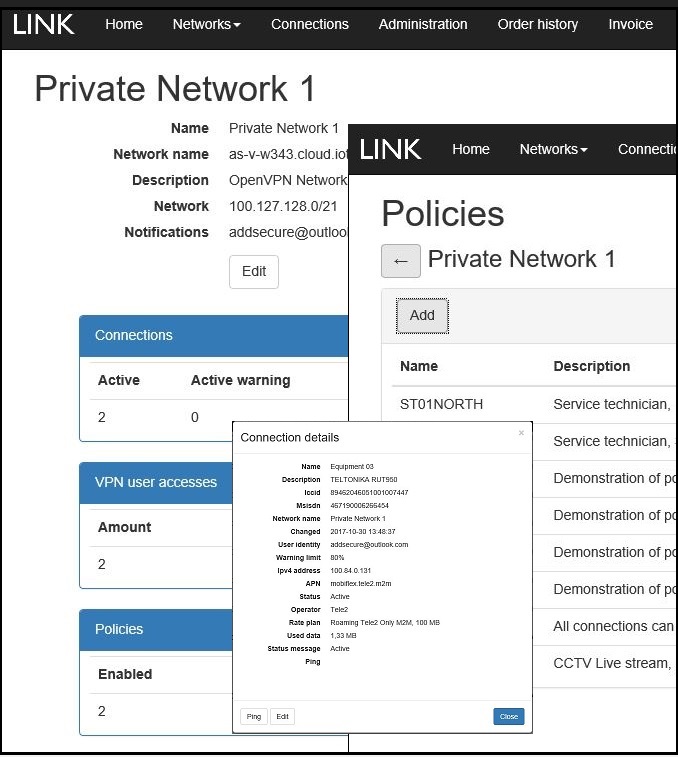
Here users can order Link Connections for their networks as well as activate, pause, and stop subscriptions, if desired. They can select which type of traffic (rates and volumes) suits each subscription as well as which amount of monthly traffic is allowed before the service is automatically stopped.
The customer has full control over which individuals can access the devices and networks, and can easily grant and revoke access.
Using Link Manager, you can easily create additional Link Networks with a simple push of a button.
- Get an overview of networks, connections, users, and permissions.
- Order SIM cards for Link Networks.
- Create new Link Connections, specify the desired amount of data, and set traffic notifications.
- Start, stop, and pause data subscriptions with a push of button.
- Create and manage new and current networks.
- Activate and deactivate optional features.
- Select which connections are to be included in which networks.
- Select which users are to have access to which networks.
- View and manage notifications, for example, traffic warnings.
- Assign and revoke permissions for devices and networks.
- View and retrieve traffic reports and billing information.
Roles and permissions
Customer administrator
Through Link Manager, the customer administrator has access to all settings related to the company’s Link Networks, Link Connections, and Link Access. The administrator can also create several new networks and new administrator accounts.
Link Partner
Link Partners can manage their customers without requiring assistance from AddSecure. Partners create customers in the system and order SIM cards on behalf of these customers.
Partners create and manage the customer numbers and billing information for their customers. They can also act as customer administrators.
Two-factor authentication
When the service first starts, the customer and partner log into Link Manager with simple authentication. We recommend to protect network management and connections by using two-factor authentication, which means that users must provide their user name, password, and a one-time code generated in a mobile app.
This feature is activated in Link Manager by the user. Upon activation, an authentication is conducted to ensure that the codes are generated properly.
For the service to work, the mobile app must support time-based one-time password (TOTP). Examples of apps that work with AddSecure Link are:
- Microsoft Authenticator
- Google Authenticator
For devices that are used often, the device itself can be authenticated, which means that only the password then needs to be provided upon login. If the account has not been used in more than 1 day, a one-time password (OTP) must be used when logging in.