To create a Link Connection, you must first search for the applicable SECURE SIM card and then activate it.
How to search for a SIM card:
- Get the SECURE SIM card you are going to activate.
- In the menu bar, click Connections.
- In the search box, type the six least significant digits of the SIM card’s ICCID number.
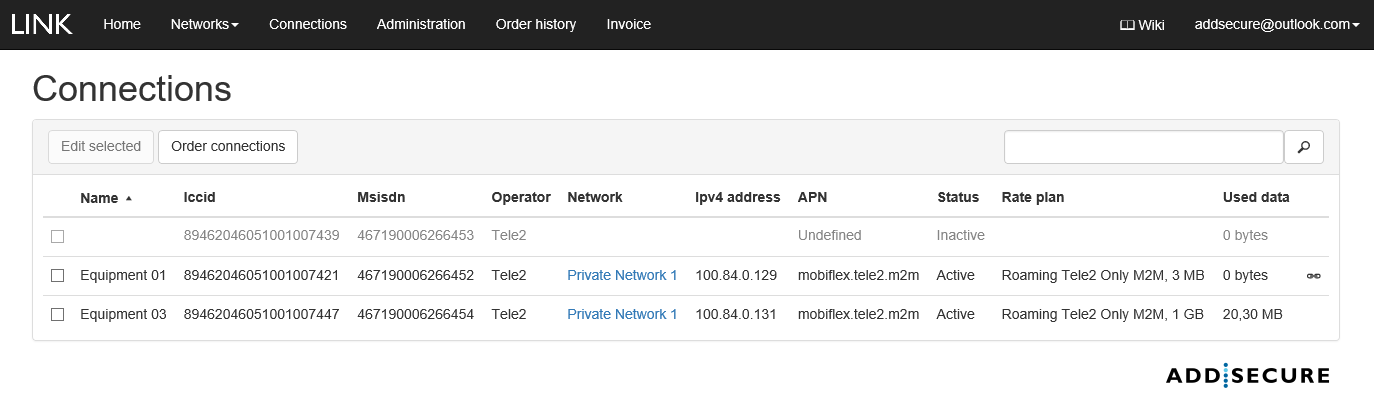
(*) Chain symbol marks that Link Connection is connected to a VPN system Access.
How to activate a SECURE SIM card:
- Follow the above instructions to find the applicable SIM card.
- Select the box next to the applicable SIM card, and then click Edit selected.
- In the Name and Description boxes, specify a name and description for the SIM card.
- Connect the SIM card to a Connect Network by clicking the network in the Network name list.
- In the Rate plan box, select a rate plan with a limit.
- In the Warning limit box, specify a threshold level. When traffic exceeds this amount, a notification is sent to the email addresses specified in 3.3.
- Select the box to agree to our terms and conditions.
- Click Activate.
 Note that activating a SIM card can take up to five minutes.
Short live demonstration of an SIM card activation: