Release notes v3.1
Release date: April 8th 2021
The Link 3.1 release focuses on ‘User-friendliness, Tools and Control’ that will simplify the daily work in Link.
The release also includes six new features and major improvements and six minor improvements. Link 3.1 also contains two major features that will be tested with limited availability and will probably be launched later in the year or early next year.
New features and major improvements in v3.1
Easier to setup and use two-step authentication (OTP)
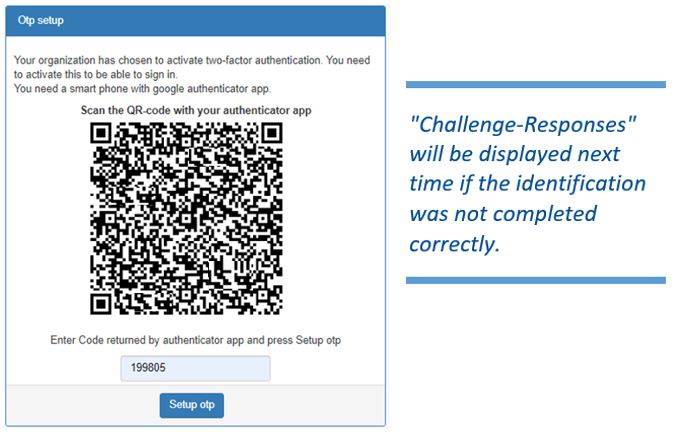
We want as many customers as possible to use two-step authentication and we have therefore simplified the function. Link customers can now swiftly and easily start using OTP login.
- Turn on OTP in Link Manager
- Add a new user
- Start log in using the credentials sent by mail
- A Challenge-Response screen with QR code appears on the screen
New Tool: List IP used by Network
This tool can be used in IP planning and list all IP ranges which are used by Connections, VPN accesses and other network functions. The view can be exported to Excel for further IP planning and documentation.
New Tool: Reconnect
It is possible with this new tool to force a ‘cancel location’ in the mobile network and reconnect a SIM during troubleshooting. The feature is located in ‘Connection details’ screen.
When pushing ‘Reconnect’ the subscriber’s data is deleted in a ‘cancel location’ procedure. The mobile network initiates the procedure to receive an ‘update location’ and the Link Connection will be reconnected to the mobile system.
 Keep in mind that this results in a communication interruption!
Data Pool modification
New notifications and behavior for pools with subscriptions + 10 GB
- Information notification is sent when 80% of the data pool is used.
- Warning notification is sent when Excess data is started.
- Critical Notification is sent when 120% of the data pool is reached and all subscriptions in the pool are suspended.
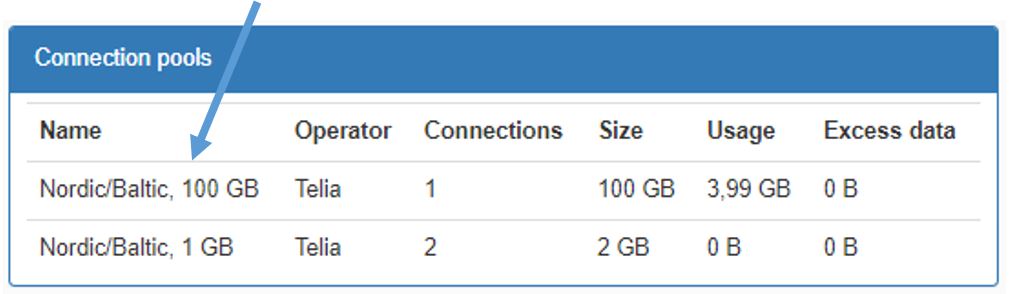
Names of pools have also been changed on the dashboard. In the past, it has been difficult in some situations to differentiate between them.
Status message on Connection details is modified to display timestamp of last update
The status has been difficult for users to understand and has now been updated.
New Status messages:
- Unknown
There is no information about the SIM card, and it has not been connected to the mobile network for the last 2 days. - Connected
The SIM card is connected to the mobile network and the timestamp shows the most recently reported radius record. - Stopped
The SIM card is not connected to the mobile network and time shows when Connection was disconnected.
Export Connection grid to Excel
Sometimes it can be difficult to get a complete view of all the Connections. To improve and get better control of all installed Connections. They can now be exported to an Excel spreadsheet.
Other improvements
- Last login is displayed in user details.
- Improved handling of Networks when ‘out of IP-addresses’ for SIM-cards.
- Public IP address is shown for Networks.
- ‘Order’ and ‘Import SIM cards’ are processed as background tasks.
- External API, limited availability (Future release candidate)
- Connection groups, limited availability (Future release candidate)
Bug fixes
- None
Kind regards,
AddSecure
Your IoT provider with a focus on Secure Critical Communications