Release notes, Link v3.5
Release date: November 24th 2022
The Link 3.5 release focuses on ‘User-friendliness and improved analysis of your connections’ simplifying the daily work in Link. The release includes five new features and major improvements and two minor improvements.
New features and major improvements in v3.5
Ordering of features
To simplify use in Link Manager, several features have been hidden and must be activated before use. Users who only have a basic need should not be disturbed by unused features in the user interface.
The following features can be ordered in Link Manager’s order module to customize the user interface:
- VPN access log
- VPN access password (Enhanced security)
- VPN System access
- IPSec
- Connection groups
Note: Existing customers with already activated features will keep their set-up.
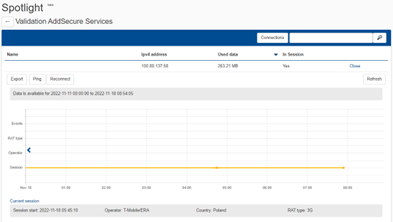
Spotlight
This comprehensive feature is valuable for general connectivity troubleshooting.
Spotlight provides a detailed, time-correlated view of the device provisioning status, real time network signaling history, and real time connection history. This information is presented together on a timeline for easy visual analysis. Additional details e.g. ping and reconnect events is displayed on the Spotlight timeline.
Connection notifications
Now, you can inform and notify different recipients on individual SIM card events. This is useful when there is a need to inform an installer of an issue with a specific Connection.
Connection data usage
On the ‘Connection information’ page, the SIM card’s daily data consumption can be downloaded for analysis.

The report is found in ‘Connection Information’. Now, the section ‘Technical information’ is hidden (collapsed) to further improve the overview on this page.
Schedule deactivation of Connection
With this feature, you can now directly deactivate the Connection or easily set a deactivation date.

Other improvements
- Instead of sending the VPN User access certificate directly to the user’s defined e-mail address, it is now possible to download it from Link Manager.
- Improved performance when showing a large number of Connections in the ‘Pool details’ view.