Welcome to AddSecure Link!
AddSecure Link is a cellular and VPN connectivity solution for large customers and IoT system integrators. Create a secure and private cloud and manage your customers’ SIM cards in our platform for 2G, 3G, 4G, Narrow Band and LTE-M coverage with multiple carrier support across Europe and with the major carriers outside of Europe, for global coverage. Link provides a complete communication infrastructure for SIM cards, remote access and monitoring of secure critical communications to installations in all types of environments.

AddSecure Link support SIM cards from:
- Tele2, Non-steered Roaming with Fixed, Flex and Pool subscriptions
- Telia, Steered Roaming with Fixed and Pool subscriptions
- Telenor, Steered Roaming with Flex subscriptions
A complete, reliable and flexible IoT solution suitable for connecting and managing a larger number of devices in a secure and easy way.
A World of Secured Simplicities!
Addsecure Link is a communications solution with a VPN and SIM management system that is fully managed by our customers. Mobile subscriptions and VPN are quickly generated in the management system and can be used immediately in different types of IoT solutions.
AddSecure Link
When machines talk to one another, it is crucial that only authorized machines and users are allowed to communicate. Traditionally this has been achieved by network technicians pairing devices and creating secure networks that only those authorized could access. With AddSecure Link, you can create these networks without being an expert at networks or routing. Your connections, subscriptions, and users are managed in an easy-to-use portal – Link Manager. The devices connected to the secure network communicate via a secure mobile network. For devices to communicate with one another over a mobile network, they need to be equipped with SIM cards from AddSecure.
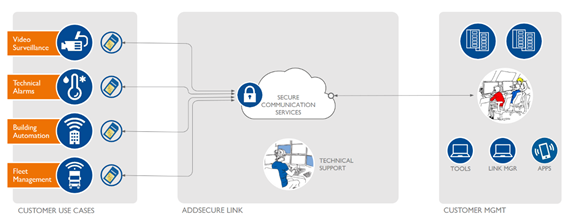
With Link Manager, you can easily order and manage your SIM cards and select traffic plans, specify settings for traffic notifications, start and stop subscriptions, and much more.
Link Manager helps you to assign permissions to specific users so that they can connect to and use the network. All traffic is encrypted; all IP addresses are hidden in the network; and no unauthorized access is allowed.
General information about the service
AddSecure Link is a communications service with fixed private IP addresses, where customers can create one or several private networks (virtual private networks, or VPNs) that are separated from other Internet users. AddSecure Link is an easy-to-use communications service for business-critical systems based on 2G, 3G, and 4G or the Internet. The service includes features that simplify integration and minimize the risk of disruptions to production systems.
AddSecure has developed the AddSecure Link service, which is a complete system solution that can be integrated into end systems. AddSecure Link is a transparent IT service that meets customer demands for quality and simplicity when it comes to building and managing systems.
The service contains a number of components and options to meet the need for traffic, security, ease of use, and performance.
Network elements of the service

Link Network is the central part of AddSecure Link, with private networks
and connections between devices, and the ability to access these securely.

Link Connection refers to the connections from devices
that are to be included in the customer’s network.

Link Manager is a web-based customer portal, where you
can manage subscriptions, networks, and devices.
It can be accessed here: https://link.addsecure.com

Link Access makes it possible to connect a computer or a
technician’s remote access to access devices in the network.
Getting started
To manage the secure network, you need to log in to the Link Manager portal. With a click of a button, you can create your first Link Network. The next step is to order a SIM card that can be connected to the network. Users can also create Link Access connections, which enable them to access their connected devices. Several Link Networks can be created, and SIM cards can be ordered for them. The administrator can also create several other administrators. When the SIM cards have been delivered, the customer uses Link Manager to decide when they are to be activated.
3. Main components and features
Link is a fully automated system based on OpenVPN. Each network is automatically generated in its own isolated virtual environment with its own CA and root certificates, dedicated CPU, memory and IP plans. See also TLS and OpenVPN for its security.
Therefore, no communication between different VPN networks is allowed and impossible to set up.
All mobile communication is connected to Link’s security gateways. Each SIM card is automatically assigned to a Link Network (VPN) and its IP plan.
Link Manager
283 views March 24, 2017 addsecure 1
Link Network
227 views July 30, 2021 Hans Öberg 0
Link User Access
249 views July 30, 2021 Hans Öberg 0
Link System Access
272 views July 30, 2021 Hans Öberg 0
Link Connection
245 views March 24, 2017 addsecure 0
Orderable add-on features in Link Manager
343 views November 22, 2022 Hans Öberg 0
4. AddSecure Link options
4.1. Access out
183 views March 24, 2017 addsecure 1
4.2. Traffic between connections
191 views March 24, 2017 addsecure 0
4.3. SIM cards
189 views March 24, 2017 addsecure 0
4.4. Varying traffic levels and traffic notifications
176 views March 24, 2017 addsecure 0
5. AddAccess options for Secure Link
5.1. AddSecure Access
242 views March 24, 2017 addsecure 1
Pricing model
The pricing model is divided into two parts, fixed security fees and flexible mobile data fees.
Security fees
The fees for the security are based on the number of active networks, user- and system accesses and number of devices.
Definition of active
Network – The network exists at the end of the month
User and system access – The access has existed during the month
Device – The SIM card has status active or has been active at any time during the month
Link Connection fees
Secure SIM is ordered and activated in Link Manager. All SIM cards are delivered non-active.
Inactive or paused Link Connections (SIM cards) do not carry a monthly fee.
Data fees – Flex

The Flex data plan varies according to data usage, with customers paying only for the amount of data they use each month. The Flex subscription uses a semi-pay-as-you-use model where the subscription automatically steps up to next bundle when all amount of data is used.
The actual used data will determine the monthly charge and is rounded up to the nearest traffic bundle. Only a maximum data level (suspension level) is set in Link Manager to avoid uncontrolled costs.
The plan is calculated individually for each card.
Data fees – Fixed
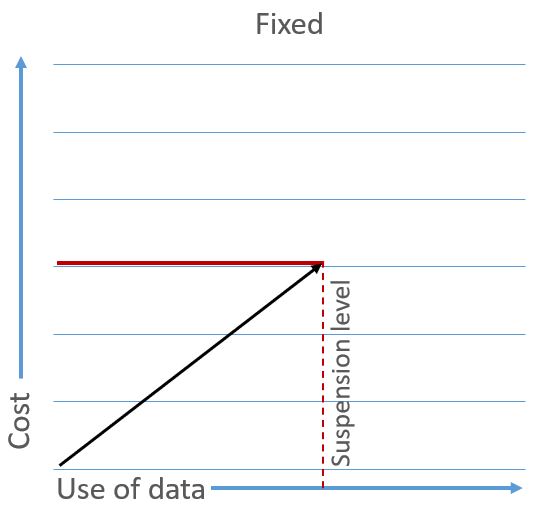
Fixed subscriptions have a fixed bundle of data and the subscription is suspended when all data is used.
The bundles can be exchanged freely during the month. The plan is individual for each card.
Data fees – Fixed with axcess data
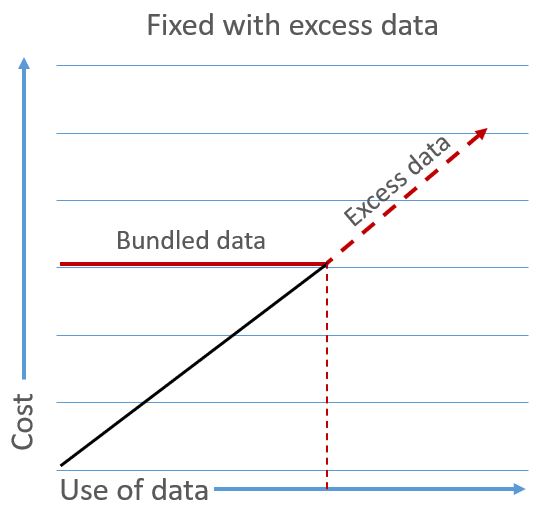
Fixed with excess data subscriptions have a fixed bundle of data and excess data will be charged when the data bundle is consumed. The bundles can be freely exchanged during an ongoing month to avoid excess traffic and optimize costs.
The plan is calculated individually for each card.
Data fees – Pool with excess data
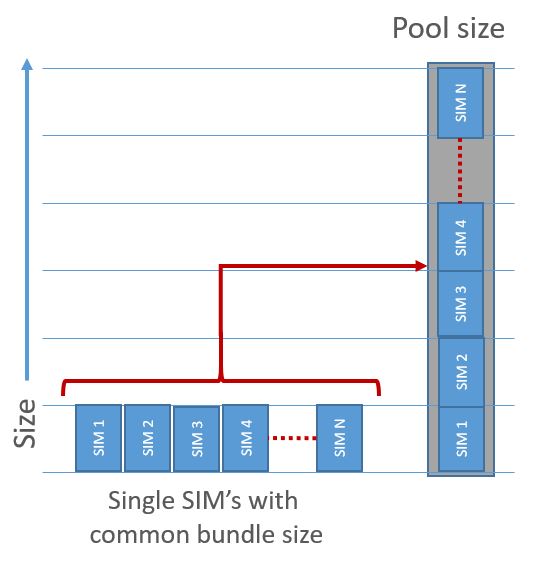
A pool with excess data has multiple SIM cards that contribute to a shared pool of data. A common pool is calculated for all SIM cards of the same size for all Link Networks. So, all cards in a pool have to have the same data amount and it is not possible to mix data amounts in the same pool.
When using the Pool data plan, each SIM card contributes its (fixed) data amount to a pool which is then shared between all cards belonging to that pool.
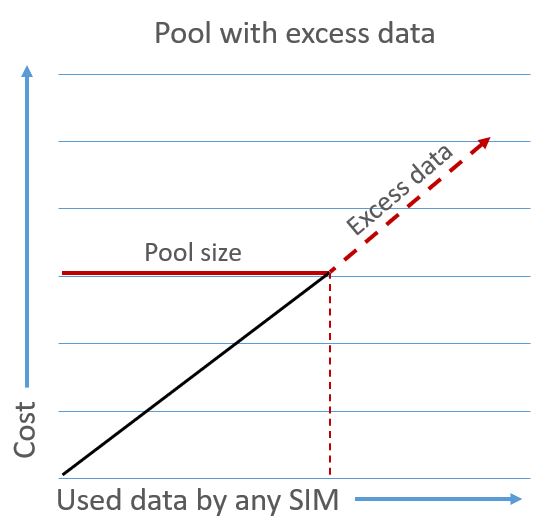
Excess data is charged when the data pool is consumed.
Pool size changes can be scheduled in Link Manager and is done at the beginning of the next month.
Invoicing
192 views March 24, 2017 addsecure 0
7. Technical details for Link Connection
The below information is not comprehensive. The below procedures use OpenVPN’s own client, but other programs are available that can also be used to remotely access the OpenVPN network.
Before starting, contact your Link Manager administrator and ask them to create a Link Access subscription and generate the email with the certificate. For more information, see section 5.
Subscriptions and data boundles
307 views March 24, 2017 addsecure 0
7.2. Network profile: Tele2 Network Sweden
162 views March 24, 2017 addsecure 0
7.3. Network profile: Tele2 Network
177 views March 24, 2017 addsecure 0
7.4. Network profile: EU+3
171 views March 24, 2017 addsecure 0
7.5. IP addressing
207 views March 24, 2017 addsecure 1
7.6. Terminal configuration
195 views March 24, 2017 addsecure 0
7.7. Performance
180 views March 24, 2017 addsecure 0
7.8. Technical interface and protocol
195 views March 24, 2017 addsecure 0
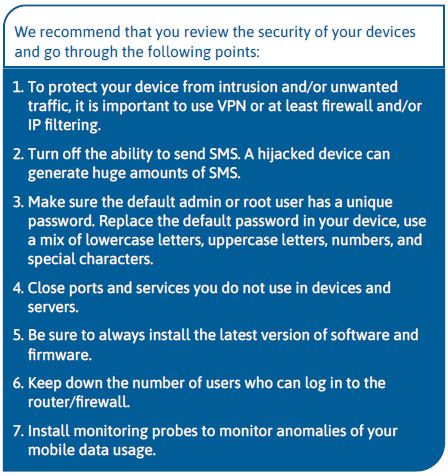
8.1. Basic security
184 views March 27, 2017 addsecure 0
8.2. Reliability
173 views March 27, 2017 addsecure 0
TLS and OpenVPN
283 views July 27, 2021 Hans Öberg 1
9.1. General information
181 views March 27, 2017 addsecure 0
9.2. User support
181 views March 27, 2017 addsecure 0
9.3. Technical consultant support
163 views March 27, 2017 addsecure 0
9.4. Maintenance routines
168 views March 27, 2017 addsecure 0